
Jumping straight into code is the biggest mistake you can make. A successful website development design project isn’t about the flashiest JavaScript library or the trendiest color palette; it’s about translating specific business objectives into a functional, user-focused digital asset. Without a clear plan, you’re not building a website; you’re building a digital money pit. Understanding the website development business itself reveals how crucial this strategic approach is. The first step is always defining what you need the site to accomplish, from generating leads to processing sales, and only then moving to wireframes and code. For e-commerce sites, choosing the right platform is key; explore top platforms for 2026. For a repeatable process to build a professional site, follow our guide, or if you’re just starting out, launch your first website with our beginner’s guide. To ensure your site is future-proof, consider these website design best practices for 2026.
This guide outlines the critical steps for planning your website. We’ll cover the phases from initial idea to post-launch maintenance, drawing on our experience building everything from e-commerce stores to custom SaaS platforms. Our ranking methodology for these steps is based on their sequential importance and impact on project outcomes, as observed across hundreds of client projects. The process flows from high-level strategy to granular execution; skipping a step is like trying to build a house by starting with the windows.
1. Define Project Goals and Website Objectives
Before you write a single line of code or choose a color scheme, you must define what success looks for this project. What is the primary purpose of this website? Is it to generate leads for your sales team? Sell products directly to consumers? Serve as a portfolio to attract clients? Or perhaps function as a complex software application? Without this clarity, your project has no north star. Every decision, from feature prioritization to content strategy, should map back to these core objectives.
Defining goals isn’t a vague exercise. It requires specific, measurable targets. For example, a goal of “increase sales” is weak. A better goal is “increase online sales by 30% within 12 months by capturing and converting traffic for our top five product categories.” This specificity forces you to think about the mechanics of achievement. A actively engaged executive sponsors, who are key to defining and championing these goals, result in 40% of projects being more successful. Your goals are the foundation of your entire website development design strategy.
- Best for: Setting a clear direction and ensuring the final product delivers tangible business value.
- Watch out for: Vague, unmeasurable goals that provide no real guidance for the development team.
2. Conduct User Research and Audience Analysis
Once you know what you want to achieve, you need to understand who you’re building the site for. Your personal preferences don’t matter; your user’s needs do. User research is the process of understanding your target audience’s behaviors, needs, and motivations. This involves creating user personas, which are detailed profiles of your ideal customers. These personas should include demographics, goals, pain points, and technical proficiency. How do they search for information? What devices do they use? What questions are they trying to answer?
This phase is critical for both design and development. The user experience (UX) and user interface (UI) are direct products of this research. For instance, if your primary audience is over 60, you’ll need larger font sizes and simpler navigation, a fact supported by Nielsen Norman Group research on senior usability. If you’re building a tool for developers, you can assume a higher level of technical knowledge and might prioritize features like API documentation and dark mode. Ignoring this step is a recipe for building a beautiful website that no one knows how to use, or simply doesn’t want to.
- Best for: Ensuring the website is intuitive, useful, and tailored to the people who will actually use it.
- Watch out for: Designing based on your own tastes or assuming you know what your users want without asking them.
3. Plan a Comprehensive SEO Strategy
Search Engine Optimization isn’t something you bolt on after launch. It must be baked into the website development design process from the very beginning. A successful SEO strategy starts with keyword research to understand the terms your audience uses to find solutions like yours. This research informs your site architecture, URL structures, content strategy, and even your page copy. By structuring your site around these topics, you signal to search engines like Google what your content is about, making it more likely to rank.
Technical SEO is a huge component of this. Your developers need to build a site that is fast, mobile-friendly, and easy for search engines to crawl and index. The probability of a user bouncing increases by 32% as page load time goes from 1 second to 3 seconds. Our development work focuses on creating sites that are not just visually appealing but technically sound, ensuring they are mobile-friendly and built to scale. A great design is wasted if no one can find the site in the first place.
- Best for: Driving long-term organic traffic and ensuring your target audience can find you through search engines.
- Watch out for: Treating SEO as an afterthought, which often requires costly and difficult architectural changes post-launch.
Don’t think of design and development as separate disciplines. A developer who ignores user experience builds an unusable product. A designer who ignores technical constraints creates an unbuildable one. They are two sides of the same coin.
4. Develop Site Architecture and Wireframes
With your goals, users, and SEO plan in place, you can start structuring the website itself. This begins with the information architecture (IA), which is the blueprint for how content is organized and labeled across your site. A logical IA creates clear navigation paths, helping users find what they need quickly and intuitively. This isn’t just about a main menu; it’s about the entire user flow, from landing page to conversion. A well-structured IA is the skeleton of your website.
Once the structure is defined, the next step is creating wireframes. Wireframes are low-fidelity, black-and-white layouts that focus on the placement of elements on a page. They are about structure, hierarchy, and functionality, not aesthetics. This stage forces you to think about the user journey on a page-by-page basis. What is the most important element on the homepage? Where should the call-to-action go? Resolving these questions in the wireframing stage is incredibly efficient. It’s far cheaper and faster to move a gray box on a wireframe than it is to recode a fully designed page.
- Best for: Creating a logical structure and user flow before investing time in visual design and coding.
- Watch out for: Getting bogged down in visual details too early or creating a site map that reflects internal company structure instead of user needs.
5. Execute Visual Design and Branding
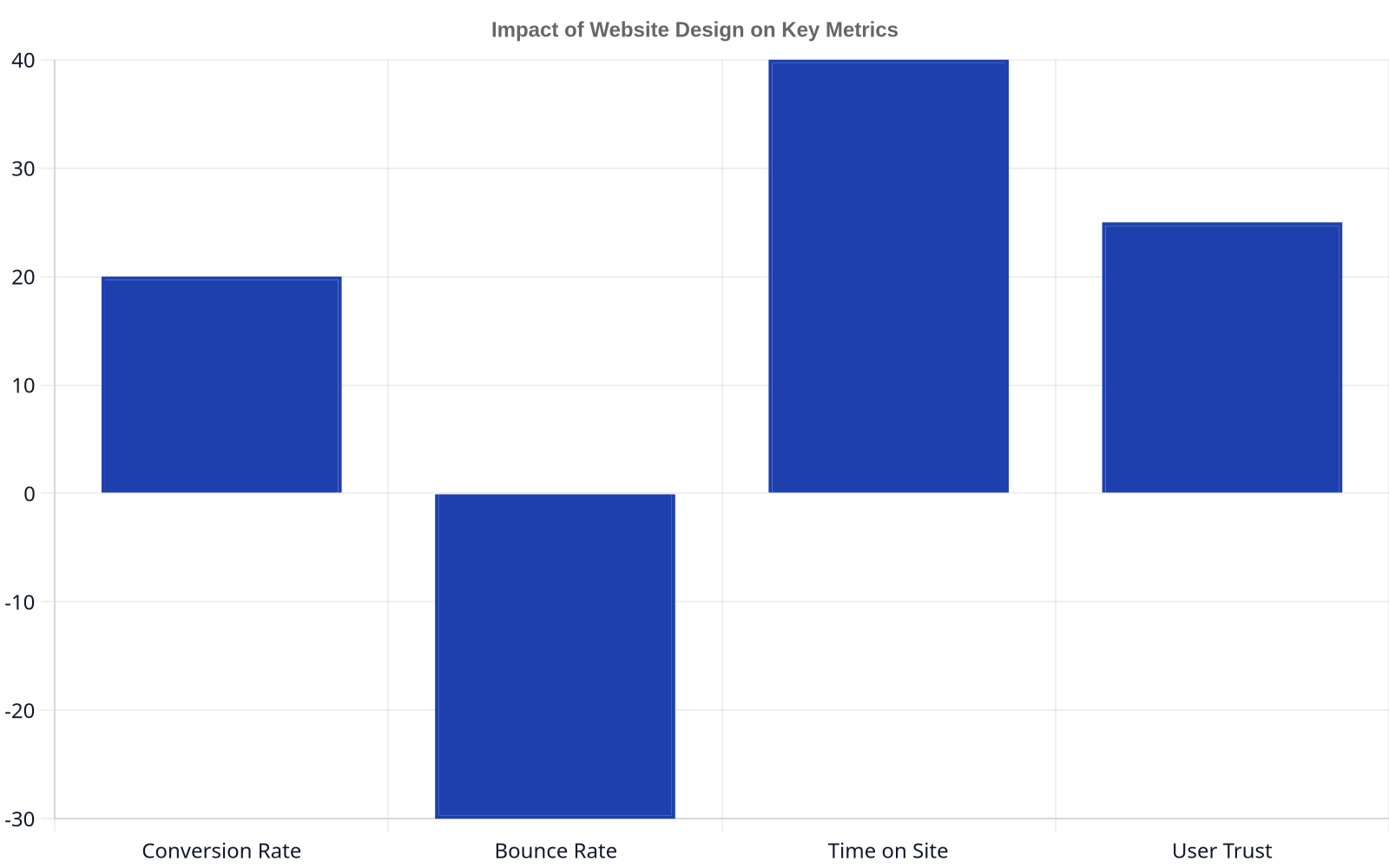
Now, and only now, is it time to think about how the website will look and feel. The visual design phase takes the approved wireframes and applies your brand identity, including colors, typography, and imagery. This is the UI (User Interface) part of the equation, and it’s about creating an emotional connection with the user. Good design builds trust and reinforces your brand’s personality. Is your brand modern and innovative? Trustworthy and traditional? Fun and playful? The visual design should communicate this instantly.
This phase also includes creating a style guide, which documents all the visual components of the site. This includes button styles, header sizes, icon usage, and more. A style guide ensures consistency across the entire website, which is especially important for larger projects or sites that will be updated by multiple team members over time. We specialize in building websites that don’t just look good, they perform. This means the design must support the user experience, guiding the user’s eye to the most important actions and information. A design that impedes usability, no matter how beautiful, is a failure.
- Best for: Creating a visually compelling and brand-aligned interface that builds trust and engages users.
- Watch out for: Prioritizing aesthetics over usability or creating a design that is inconsistent with your established brand identity.
6. Move to Development and Coding
With a complete and approved design, the project moves into the development phase. This is where the static visual designs are translated into a functional, interactive website. This phase can be broken down into two parts: front-end and back-end development. Front-end developers use languages like HTML, CSS, and JavaScript to build the parts of the website that users see and interact with in their browser. They are responsible for ensuring the design is implemented pixel-perfectly and that the site is responsive, meaning it works flawlessly on all devices from desktops to smartphones.
Back-end developers work on the server-side, building the core logic of the application. They manage the database, user authentication, and all the behind-the-scenes functionality that makes the website work. For an e-commerce site, this would include the shopping cart, payment processing, and order management. For a SaaS platform, this is the entire application logic. Choosing the right technology stack (e.g., a CMS like WordPress, a framework like React or Laravel, or a fully custom build) is a critical decision that depends on the project’s goals for scalability, performance, and maintainability. This is where a deep understanding of web development is crucial.
- Best for: Bringing the designs to life and building the functional core of the website.
- Watch out for: Poor coding practices that lead to slow load times, security vulnerabilities, or a site that is difficult to update.
A website is never ‘done.’ Launching is not the finish line; it’s the starting line for a new phase of optimization, testing, and iteration based on real user data.
7. Conduct Rigorous Testing and Quality Assurance
Before the website goes live, it must undergo a thorough testing and Quality Assurance (QA) process. The goal is to find and fix as many bugs as possible before your users encounter them. This isn’t just about checking for broken links. Comprehensive QA involves multiple types of testing. Functional testing ensures all features work as intended. Usability testing confirms that real users can navigate the site and accomplish their goals. Performance testing checks for speed and stability under load. Compatibility testing verifies the site works correctly across different browsers, operating systems, and devices. Fixing a bug post-release can cost up to 30 times more than fixing it during the design or development phase, impacting your overall website development cost.
This phase should be systematic. A QA tester should follow a detailed test plan, attempting to “break” the site in creative ways. Does the contact form handle incorrect email formats? What happens when a user uploads an image that is too large? How does the layout look on an old model of iPhone? Each bug should be documented, prioritized, and assigned to a developer for fixing. Rushing through QA is a false economy that almost always leads to a poor user experience and damage to your brand’s reputation upon launch.
- Best for: Ensuring a high-quality, bug-free, and stable website before it goes live to the public.
- Watch out for: Cutting corners on testing to meet a deadline, which leads to a poor launch experience for users.
8. Launch, Monitor, and Iterate
The final step is to deploy the website to a live server and make it accessible to the public. But the work doesn’t end here. The launch is the beginning of the most important phase: monitoring and iteration. Once the site is live, you can start gathering real-world data on how users are interacting with it. Tools like Google Analytics are essential for tracking key metrics like traffic sources, user behavior, and conversion rates. Are users following the intended paths? Where are they dropping off?
This data provides the insights needed for ongoing optimization. Maybe a key call-to-action button isn’t getting clicked, suggesting its design or placement needs to be changed. Perhaps a particular page has an unusually high bounce rate, indicating the content isn’t meeting user expectations. A successful website is a living asset that evolves based on user feedback and data. This iterative approach of building, measuring, and learning is the only way to ensure your website continues to meet its business objectives long after launch day. Plan for ongoing maintenance and periodic updates to keep the site secure, relevant, and effective.
- Best for: Turning a static website into a dynamic business tool that improves over time.
- Watch out for: Treating the launch as the end of the project and failing to invest in ongoing analysis and improvement.
Summary of the Website Development Design Process
| Phase | Primary Goal | Key Activities | Common Pitfalls |
|---|---|---|---|
| 1. Define Goals | Establish clear, measurable objectives for the website. | Stakeholder interviews, defining KPIs. | Vague or unrealistic goals. |
| 2. User Research | Understand the target audience’s needs and behaviors. | Creating user personas, journey mapping. | Designing for yourself, not the user. |
| 3. SEO Strategy | Integrate search optimization from the start. | Keyword research, technical SEO planning. | Treating SEO as a post-launch task. |
| 4. Architecture & Wireframes | Plan the site’s structure and layout. | Information Architecture, low-fidelity mockups. | Unintuitive navigation, skipping this step. |
| 5. Visual Design | Apply branding and create the user interface. | UI design, creating a style guide. | Aesthetics over usability. |
| 6. Development | Write the code to build the functional website. | Front-end and back-end coding. | Poor performance, security flaws. |
| 7. Testing & QA | Find and fix bugs before launch. | Functional, usability, performance testing. | Inadequate testing to save time. |
| 8. Launch & Iterate | Deploy the site and continuously improve it. | Monitoring analytics, A/B testing, updates. | ‘Set it and forget it’ mentality. |
Frequently Asked Questions
What is the difference between website design and website development?
Website design refers to the visual look and feel of a site (UI) and the user’s experience navigating it (UX). It involves color schemes, typography, layout, and creating an intuitive journey. Website development is the process of building and maintaining the site’s core structure using code. Front-end development brings the design to life in the browser, while back-end development powers server-side features like databases and user accounts.
How do I choose between a custom-built site and a website builder?
Website builders like Squarespace or Wix are great for simple, brochure-style websites, personal portfolios, or small businesses with standard needs and limited budgets. A custom build is the better choice when you require unique functionality, complex integrations (like with a custom CRM or ERP), high scalability for future growth, or a specific design that cannot be achieved with a template. The choice depends on your project’s complexity, budget, and long-term goals.
How much does website development design cost?
Costs vary dramatically based on complexity. A simple brochure site using a template might cost a few thousand dollars. Always get detailed quotes from multiple agencies.
What are the core principles of effective website design?
Effective design prioritizes the user. Key principles include: 1) Clear Visual Hierarchy: Guiding the user’s attention to the most important elements. 2) Intuitive Navigation: Making it easy for users to find what they’re looking for. 3) Responsive Design: Ensuring the site works perfectly on all devices. 4) Fast Load Speed: Users are impatient; a slow site will be abandoned. 5) Accessibility: Designing so people with disabilities can use your site, as outlined in the WCAG guidelines.
How long does the website development process take?
A basic template-based website can be launched in a few weeks. A custom website for a small business typically takes 2 to 4 months from initial planning to launch. A large, complex project like an e-commerce platform or SaaS application can take 6 months to a year or more. The timeline is heavily dependent on the project’s scope, the complexity of the features, and the client’s ability to provide timely feedback and content.