
Website Development How To: A No-Nonsense 2026 Guide
Is your website an asset or a liability? For most businesses, it’s a glorified business card, collecting digital dust. The goal of this website development how-to guide is to give you a repeatable process to build a site that functions as a core part of your growth engine. To do this, you must treat website development not as a one-off project but as a strategic business initiative. If you’re just starting out, learn how to launch your first website with our beginner’s guide. By the end of this guide, you will have a step-by-step framework to plan, build, and launch a professional website that actively contributes to your goals.
Prerequisites
Before you write a single line of code or hire a developer, you need:
- A defined goal: What is the single most important action you want a visitor to take? (e.g., Book a call, buy a product, sign up for a newsletter). If you have more than one primary goal, you have none.
- A target audience profile: Who are you building this for? What are their technical skills and expectations? A site for SaaS developers looks very different from one for a local bakery’s customers.
- A content strategy: You need to know what pages you need (e.g., Home, About, Services, Contact, Blog) and have the basic content for them ready. A website without content is just an empty frame.
- A budget: Whether it’s $500 for a DIY template or $50,000+ for a custom build, you need a realistic budget. A 2024 analysis by Forbes Advisor shows professional small business sites can range from $2,500 to over $40,000.

Step 1: Define Your Technical and Strategic Requirements
This is the most critical and most-skipped step. A detailed plan prevents scope creep, budget overruns, and a final product that doesn’t meet your needs. Your requirements document should answer:
Functionality: What must the site do*? This includes user accounts, payment processing (Stripe, PayPal), search functionality, content management systems (CMS), or integrations with third-party APIs (like a CRM or email marketing tool).
- Technical Stack: Will you use a website builder like Squarespace or Webflow? Or a more flexible framework like WordPress? For custom applications like the SaaS platforms we build, a framework like React or Vue.js on the front end with a Node.js or Django back end might be necessary.
- Hosting: Where will your site live? Options range from shared hosting for a few dollars a month (Bluehost, HostGator) to dedicated servers or cloud platforms like AWS or Google Cloud for high-traffic applications. Hosting and maintenance can cost anywhere from $24 to $10,000+ per year.
Step 2: Create Wireframes and a Sitemap
A sitemap is a blueprint of your website’s structure. It’s a flowchart showing every page and how they link together. This ensures a logical user flow and that search engines can find all your content.
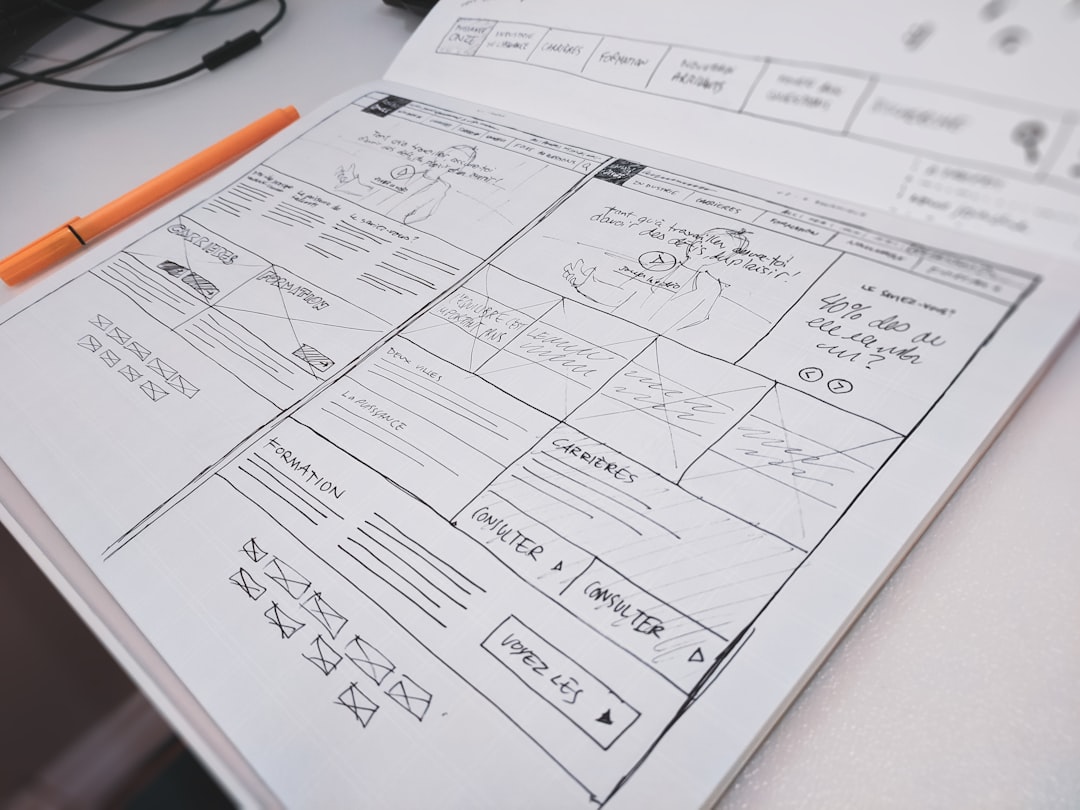
Once the sitemap is approved, you create wireframes. Wireframes are low-fidelity, black-and-white layouts of each key page. They focus exclusively on structure, layout, and content hierarchy, deliberately ignoring color, fonts, and images. This forces you to focus on usability before getting distracted by aesthetics. Tools like Balsamiq, Figma, or even pen and paper are perfect for this stage. Don’t invest in a full design until the wireframes are locked down.
Step 3: Design High-Fidelity Mockups
With approved wireframes, the designer creates high-fidelity mockups. These are full-color, pixel-perfect representations of what the final website will look like. This is where your brand identity (logo, colors, typography) comes to life. The mockup should include designs for desktop, tablet, and mobile views. With over 60% of website traffic coming from mobile devices, a mobile-first design approach isn’t optional, it’s essential.
Don’t let a committee design your website. The design phase is where a singular, clear vision is most important. Too many opinions create a bland, compromised result that pleases no one.
This is the last point for major changes to be made cheaply. A change in Figma is a few clicks; a change in code can take days. Get sign-off from all stakeholders on these final designs before a single line of code is written.
Step 4: Choose Your Development Environment and Write the Code
Now, the developers take the approved mockups and turn them into a functional website. We handle both front-end and back-end development as part of our Web & Software Development services. The process generally follows these sub-steps:
- Set up a local development environment: Developers work on their own computers using tools that mimic the live server. This allows them to build and test without affecting the public.
- Front-End Development: This is the part of the site you see. Using HTML for structure, CSS for styling, and JavaScript for interactivity, developers translate the mockups into browser-compatible code. They’ll use frameworks like React or Vue.js to build modern, interactive user interfaces.
- Back-End Development: This is the server-side logic that powers the site. It includes the database, user authentication, and application logic. Common languages include PHP (powering WordPress), Python (with Django or Flask), and Node.js.
- Version Control: All code should be managed using a version control system like Git, with a repository hosted on GitHub or GitLab. This tracks every change, prevents conflicts, and makes it possible to roll back to a previous version if something breaks.
Step 5: Content Population and CMS Setup
A website without content is an empty shell. Now is the time to load in the text, images, and videos you prepared earlier. If you’re using a Content Management System (CMS) like WordPress or a headless CMS like Contentful, this is when you set up the required fields and page templates. A good CMS allows non-technical users to update website content without needing to call a developer.
This is a key part of what we deliver: a site that doesn’t just look good, but is easy for your team to manage long-term. Whether it’s a simple blog or complex e-commerce stores, the client must have control over their own content.
Step 6: Rigorous Testing and Quality Assurance
Before launch, the site must undergo exhaustive testing. This isn’t a quick five-minute check; it’s a formal process to find and fix bugs.
Your QA checklist should include:
- Cross-Browser Testing: Does the site work correctly on Chrome, Firefox, Safari, and Edge?
- Responsive Testing: Does it look and function correctly on various mobile devices, tablets, and desktop screen sizes?
- Functionality Testing: Does every link, button, and form work as expected? Test the checkout process, contact forms, and any other interactive element.
- Performance Testing: How fast does the site load? Use tools like Google PageSpeed Insights to identify and fix bottlenecks. A site that takes more than 3 seconds to load will lose visitors.
- Security Audit: Scan for common vulnerabilities like SQL injection or cross-site scripting (XSS).
Step 7: Launch and Post-Launch Monitoring
After all tests are passed and every bug is squashed, it’s time to deploy the website to the live server. The launch process typically involves:
- Final Backup: Back up the old site (if there is one) and the new site’s database and files.
- Domain Pointing: Update the Domain Name System (DNS) records to point your domain name to the new server’s IP address.
- Final Checks: Once the site is live, do one last run-through to ensure everything works as it did on the staging server.
- Monitoring: Use tools like Google Analytics and Google Search Console to monitor traffic, user behavior, and search engine indexing. Watch for any 404 errors or performance dips.
A website launch isn’t a finish line; it’s the starting gun. The real work begins now: analyzing data, gathering user feedback, and planning the next set of improvements.
Your website is a living asset. Plan for ongoing maintenance, security updates, and feature enhancements. Technology and user expectations are constantly changing, and a site that is left untouched for a year is a site that is falling behind.
Troubleshooting Common Issues
- Slow Load Times: The most common culprit is unoptimized images. Run all images through a compression tool before uploading. Other causes include bloated code, too many plugins (on WordPress), or a slow hosting plan.
- Forms Not Submitting: This is often a JavaScript error or a server-side configuration issue. Use your browser’s developer tools to check the console for errors when you try to submit the form.
- Broken Layout on Mobile: This is a CSS issue. A “responsive design” doesn’t happen by accident. It requires specific CSS media queries to adjust the layout for different screen sizes. Use a tool like Chrome’s device simulator to debug.
If you’re feeling overwhelmed, that’s normal. Building a professional website is a complex project. If this process seems like more than you want to handle, book a call with us and let our team manage the entire process for you, from strategy to launch and beyond.
FAQ
How long does it take to build a website?
This varies wildly based on complexity. A simple brochure site using a template might take 1-2 weeks. A custom e-commerce site with thousands of products could take 4-6 months. A complex SaaS application can take a year or more. The planning and design phases typically take 2-6 weeks, with development taking the bulk of the time.
How much does a website cost in 2026?
Our guide on startup website cost provides a more detailed breakdown.
What is the difference between a website builder and WordPress?
A website builder (like Squarespace or Wix) is a closed, all-in-one platform that is easy to use but offers limited flexibility. WordPress is an open-source CMS that offers immense flexibility and control but requires more technical knowledge to manage hosting, security, and updates.
Do I need to know how to code to build a website?
No. For simple sites, platforms like Webflow, Squarespace, and Wix allow you to build a professional-looking site with no code. However, for any custom functionality, unique design, or to optimize performance, you will need HTML, CSS, and JavaScript skills, or you’ll need to hire a developer.
What is front-end vs. back-end development?
Front-end development deals with everything the user sees and interacts with in their browser (layout, design, buttons). It’s built with HTML, CSS, and JavaScript. Back-end development is the server-side of the application; it handles the database, user logic, and communicates with the front end. It’s the engine under the hood.
How important is mobile-friendliness?
It is non-negotiable. Google uses mobile-first indexing, meaning it primarily uses the mobile version of your content for indexing and ranking. More importantly, a huge portion of your users will visit on a mobile device. A poor mobile experience is a guaranteed way to lose customers.